What Is WebP and Why Should You Use It Instead of JPG?
WebP is Google's modern image format that produces files 30-50% smaller than JPG with the same visual quality. Learn why it matters and how to use it.
If you have a website, you have probably been told to use WebP instead of JPG for your images. But what is WebP, why is it smaller, and does it actually look as good? This guide explains what WebP is, when to use it, and how to convert your existing images to WebP for free.
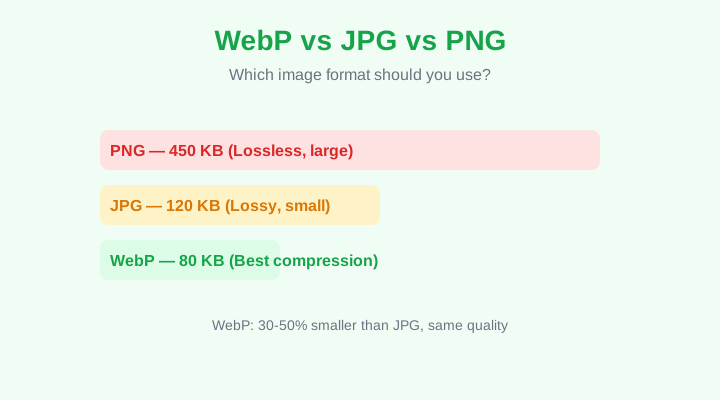
WebP produces significantly smaller files than JPG and PNG
What Is WebP?
WebP is an image format developed by Google, released in 2010. It uses both lossy compression (like JPG) and lossless compression (like PNG), but achieves significantly smaller file sizes for both. A WebP image can be 25-35% smaller than a comparable JPG and 65-80% smaller than a PNG, with no visible quality loss.
How Much Smaller Is WebP?
For a typical 1920x1080 photo: the same image as a PNG might be 450 KB, as a JPG at quality 80 it would be about 120 KB, and as a WebP at quality 80 it would be about 80 KB. That is a 33% reduction over JPG and an 82% reduction over PNG — for the same visual quality.
Browser Support
WebP is supported by all modern browsers: Chrome, Firefox, Safari (since version 14), Edge, Opera, and all mobile browsers. As of 2026, over 96% of web users can view WebP images. The only browsers that cannot are very old versions of Internet Explorer and Safari (13 and earlier). For most websites, WebP is safe to use without a fallback.
WebP Supports Transparency
Unlike JPG, WebP supports alpha transparency — the same as PNG. This means you can have images with transparent backgrounds (logos, icons, graphics) in a format that is 65-80% smaller than PNG. This alone makes WebP superior to both JPG and PNG for most use cases.
When to Use WebP vs JPG vs PNG
- WebP — Best for almost everything. Photos, graphics, logos, icons with transparency. Smallest file size.
- JPG — Use only if you need maximum compatibility with very old browsers or systems that do not support WebP.
- PNG — Use only for small icons or graphics where lossless quality matters more than file size, or when WebP is not supported.
- AVIF — Newer than WebP with even better compression, but browser support is still limited. Use with caution.
How to Convert to WebP for Free
- Go to the PureFileConverter Image Converter tool page.
- Upload your JPG, PNG, or WebP image.
- Select WebP as the output format.
- Download the converted WebP file.
Converting to WebP is one of the easiest ways to speed up your website. Smaller images mean faster page loads, better Core Web Vitals, and higher Google rankings.
WebP for SEO
Google uses page speed as a ranking factor. Switching from JPG or PNG to WebP can reduce your page weight by 30-80%, which directly improves your Largest Contentful Paint (LCP) score — one of Google's Core Web Vitals. Faster pages rank higher and convert better.
Related Articles
How to Resize Images Online Without Losing Quality — Free Guide
Resize JPG, PNG and WebP images to exact dimensions for web, social media, or print. Learn the right method to avoid blurriness and stretching.
Image GuidesHow to Compress JPG Images for Faster Loading — Free Guide
Reduce JPG and WebP file sizes without visible quality loss. Learn the right quality settings and how compression works.
Image GuidesHow to Convert PNG to JPG Online — Free Guide
Convert PNG images to JPG for smaller file sizes. Learn what happens to transparency and how to handle it.